Note
Go to the end to download the full example code.
Balance Assist E-Bike with Roll Rate Feedback Steer Control
This example shows how to work with a model that includes a feedback controller and how to use a simple derivative control with it. The TU Delft Bicycle Lab developed a bicycle with a steer motor that can be controlled based on sensor measurements from an inertial measurement unit mounted on the rear frame, a steer angle sensor, and a speed sensor. The bicycle is based on an e-bike model from Royal Dutch Gazelle:

Gazelle Grenoble/Arroyo E-Bike modified with a steering motor. Battery in the downtube and electronics box on the rear rack.
import numpy as np

from bicycleparameters.main import Bicycle
from bicycleparameters.io import remove_uncertainties
from bicycleparameters.parameter_sets import Meijaard2007ParameterSet
from bicycleparameters.models import Meijaard2007WithFeedbackModel
Set Up a Model
First, load the physical parameter measurements of the bicycle from a file
and create a
Meijaard2007ParameterSet.
data_dir = "../../data"

bicycle = Bicycle("Balanceassistv1", pathToData=data_dir)
par = remove_uncertainties(bicycle.parameters['Benchmark'])
par['v'] = 1.0
par_set = Meijaard2007ParameterSet(par, False)
par_set
Found the RawData directory: ../../data/bicycles/Balanceassistv1/RawData
Looks like you've already got some parameters for Balanceassistv1, use forceRawCalc to recalculate.
The following plot depicts the geometry and inertial parameters with the inertia of the rider included.
par_set.plot_all()
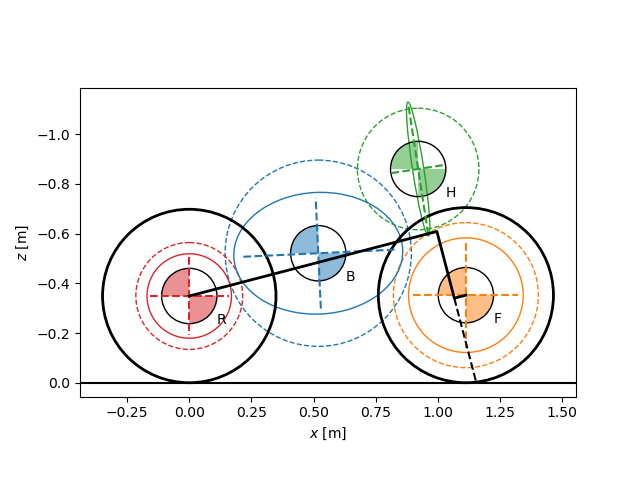
<Axes: xlabel='$x$ [m]', ylabel='$z$ [m]'>
Create a Meijaard2007WithFeedbackModel.
The parameter set does not include the feedback gain parameters, but
to_parameterization()
will be used to convert the parameter set into one with the gains.
model = Meijaard2007WithFeedbackModel(par_set)
model.parameter_set
The model shows a small self-stable speed range.
speeds = np.linspace(0.0, 10.0, num=501)
ax = model.plot_eigenvalue_parts(v=speeds)
ax.set_ylim((-10.0, 10.0))
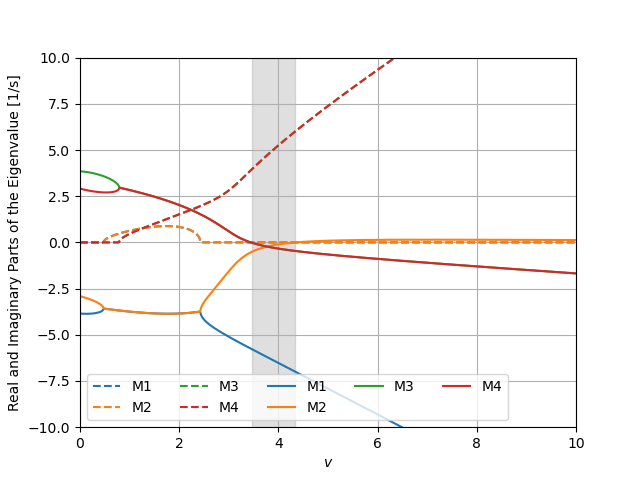
(-10.0, 10.0)
Add a Rider
If the data files for a rider are present in the data directory, you can add a rider and the package Yeadon will be used to configure a rider to sit on the bicycle. You can check if a rider is properly configured by plotting the geometry which will now include a stick figure depiction of the rider.
bicycle.add_rider('Jason', reCalc=True)
bicycle.plot_bicycle_geometry(inertiaEllipse=False)
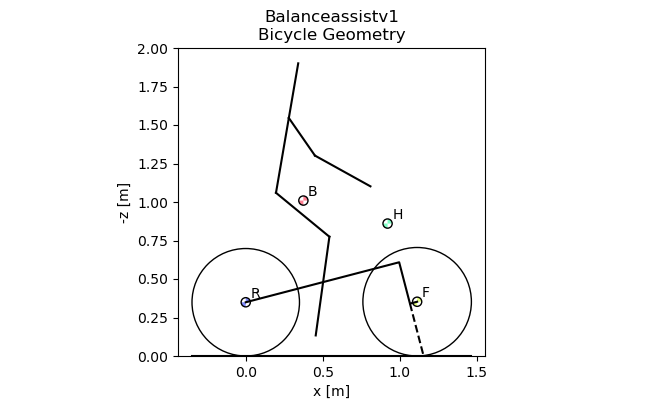
There is no rider on the bicycle, now adding Jason.
Calculating the human configuration.

<Figure size 647.214x400 with 1 Axes>
The inertia representation now reflects the larger inertia of the rear frame due to the rigid rider addition.
par = remove_uncertainties(bicycle.parameters['Benchmark'])
par['v'] = 1.0
par_set = Meijaard2007ParameterSet(par, True)
par_set.plot_all()
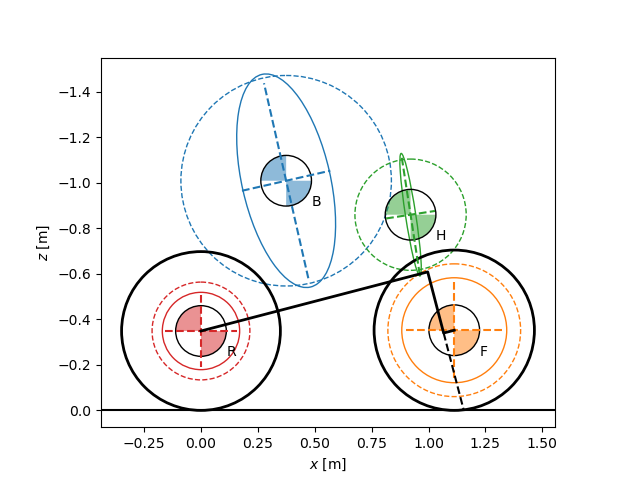
<Axes: xlabel='$x$ [m]', ylabel='$z$ [m]'>
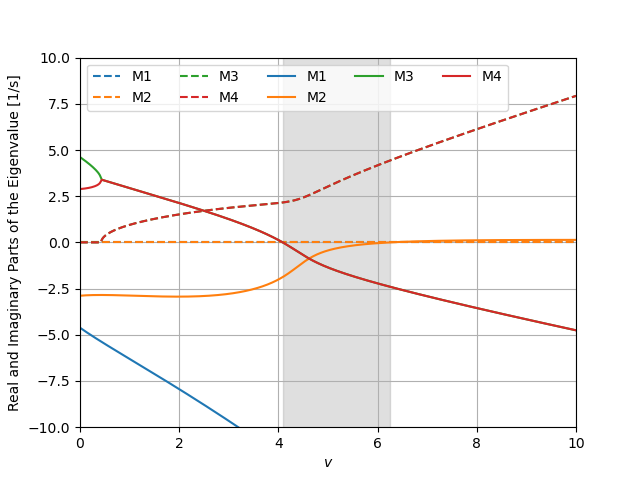
The self-stable speed range begins at a higher speed and becomes wider.
model = Meijaard2007WithFeedbackModel(par_set)
ax = model.plot_eigenvalue_parts(v=speeds)
ax.set_ylim((-10.0, 10.0))
(-10.0, 10.0)
Add Control
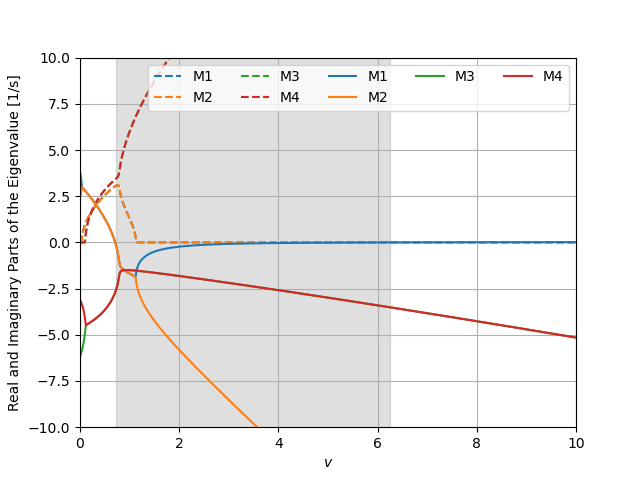
It turns out that controlling the steer torque with a positive feedback on roll angular rate, the bicycle can be stabilized over a large speed range. For example, setting \(k_{T_\delta \dot{\phi}}=-50\) gives this effect:
ax = model.plot_eigenvalue_parts(v=speeds, kTdel_phid=-50.0)
ax.set_ylim((-10.0, 10.0))
(-10.0, 10.0)
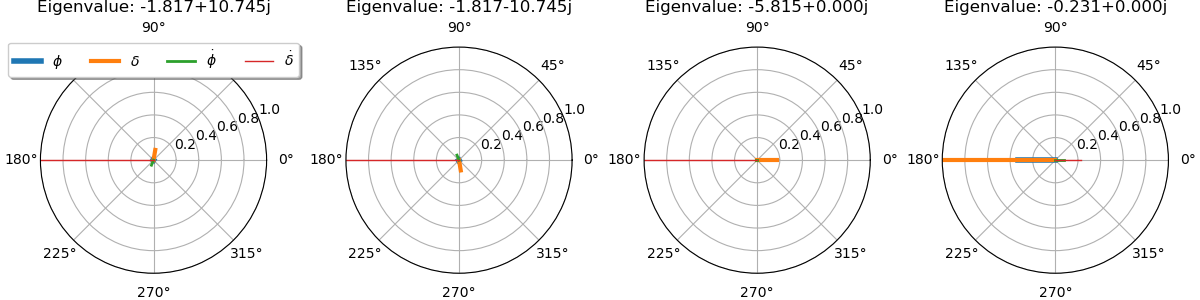
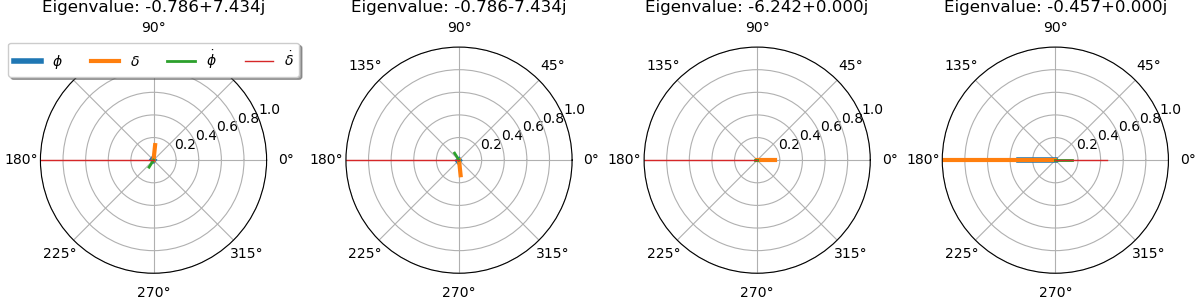
The eigenvectors at low speed show that the weave mode has a steer dominated high frequency natural motion. This may not be so favorable.
speed = 2.0
ax = model.plot_eigenvectors(v=speed, kTdel_phid=-50.0)
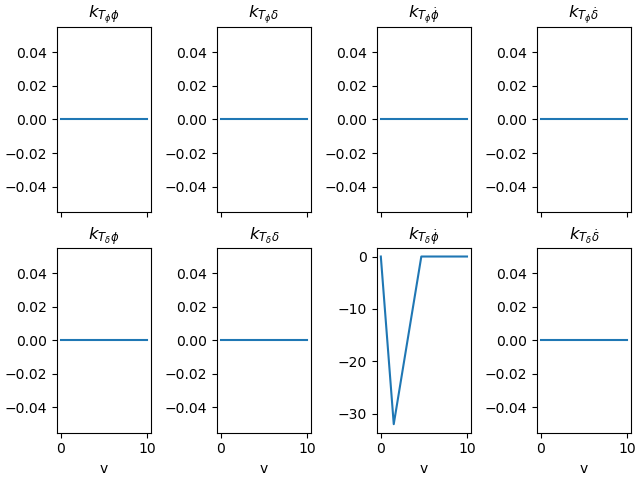
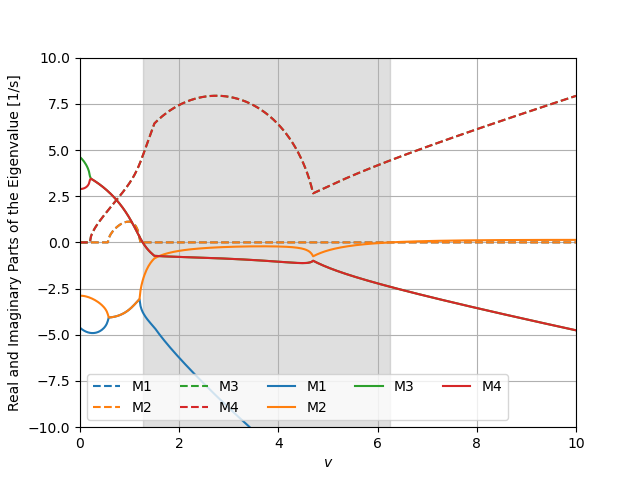
You can also gain schedule with respect to speed. A linear variation in the roll rate gain can make the weave eigenfrequency have lower magnitude than using simply a constant gain.
vmin, vmin_idx = 1.5, np.argmin(np.abs(speeds - 1.5))
vmax, vmax_idx = 4.7, np.argmin(np.abs(speeds - 4.7))
kappa = 10.0
kphidots = -kappa*(vmax - speeds)
kphidots[:vmin_idx] = -kappa*(vmax - vmin)/vmin*speeds[:vmin_idx]
kphidots[vmax_idx:] = 0.0
model.plot_gains(v=speeds, kTdel_phid=kphidots)
array([[<Axes: title={'center': '$k_{T_{\\phi}\\phi}$'}>,
        <Axes: title={'center': '$k_{T_{\\phi}\\delta}$'}>,
        <Axes: title={'center': '$k_{T_{\\phi}\\dot{\\phi}}$'}>,
        <Axes: title={'center': '$k_{T_{\\phi}\\dot{\\delta}}$'}>],
       [<Axes: title={'center': '$k_{T_{\\delta}\\phi}$'}, xlabel='v'>,
        <Axes: title={'center': '$k_{T_{\\delta}\\delta}$'}, xlabel='v'>,
        <Axes: title={'center': '$k_{T_{\\delta}\\dot{\\phi}}$'}, xlabel='v'>,
        <Axes: title={'center': '$k_{T_{\\delta}\\dot{\\delta}}$'}, xlabel='v'>]],
      dtype=object)
Using the gain scheduling gives this effect to the dynamics:
ax = model.plot_eigenvalue_parts(v=speeds, kTdel_phid=kphidots)
ax.set_ylim((-10.0, 10.0))
(-10.0, 10.0)
kphidot = kphidots[np.argmin(np.abs(speeds - speed))]
ax = model.plot_eigenvectors(v=speed, kTdel_phid=kphidot)
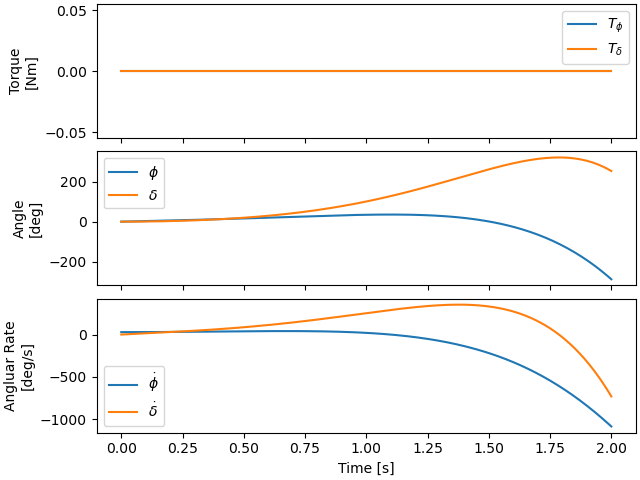
We can then simulate the system at a specific low speed and see the effect control has. First, without control:
times = np.linspace(0.0, 2.0, num=201)
x0 = np.array([0.0, 0.0, 0.5, 0.0])
ax = model.plot_simulation(times, x0, v=speed)
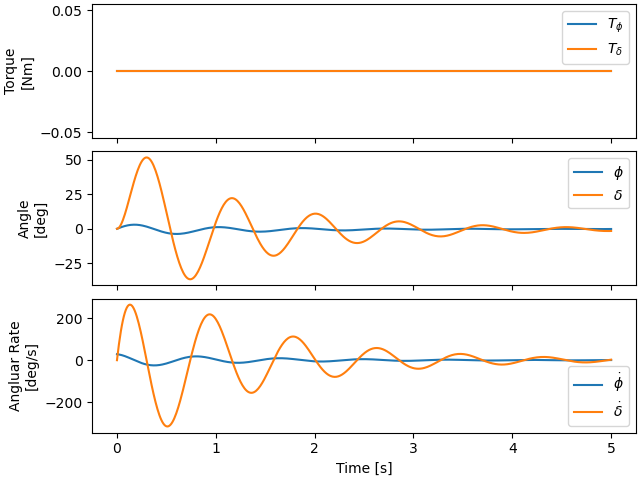
And with control:
times = np.linspace(0.0, 5.0, num=501)
ax = model.plot_simulation(times, x0, v=speed, kTdel_phid=kphidot)
Total running time of the script: (0 minutes 2.867 seconds)